


Lower back pain from sitting at a desk often comes down to one thing: lumbar support.
But when you search for solutions, you’ll often see two options:
- Built-in lumbar support (in ergonomic chairs)
- External lumbar cushions (add-on support you attach to your chair)
Both can help but they’re not interchangeable.
Here’s a practical breakdown to help you choose what actually works for your body and your setup.
What Is Lumbar Support?
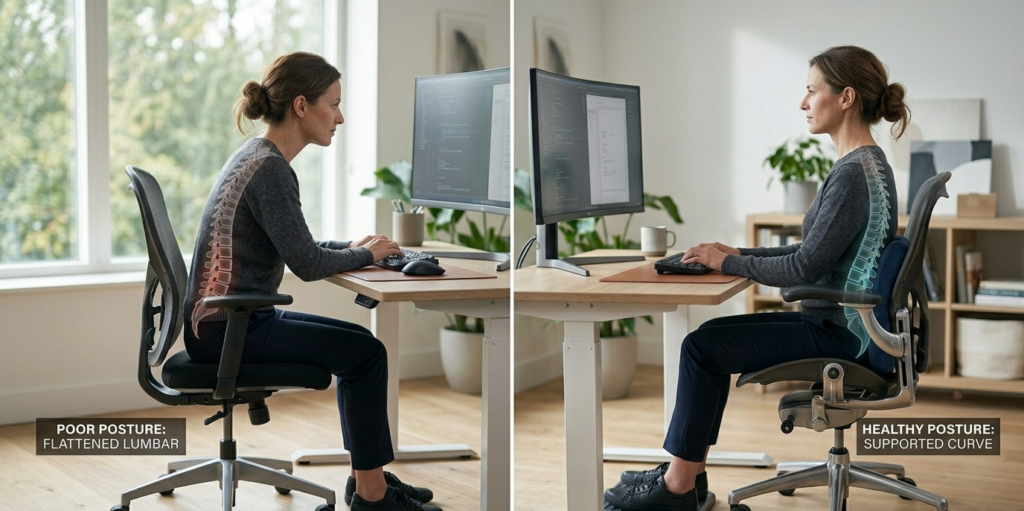
Your lower spine naturally curves inward; this curve is called the lumbar lordosis.
When you sit without support, that curve flattens. Over time that increases pressure on discs and muscles, leading to discomfort, stiffness, or pain.
Proper support fills the space under your lower back so your spine doesn’t collapse forward.
This principle is supported by ergonomics research from the Cleveland Clinic, which highlights spine-friendly seating as a key factor in reducing back strain.
Built-In Lumbar Support vs External Cushion: Side-by-Side
| Feature | Built-In Lumbar Support | External Lumbar Cushion |
| Customizability | Often limited | Highly adjustable |
| Portability | Chair-dependent | Can move between seats |
| Support Strength | Moderate to high | Varies by cushion type |
| Best For | Dedicated ergonomic chair users | Anyone with existing chair |
| Cost | Integrated (chair price) | Budget-friendly |
Built-In Lumbar Support: What It Really Means
Pros
- Designed for specific chair geometry: Supports the spine in harmony with the seat and backrest
- Often adjustable: Many ergonomic chairs let you adjust height and depth of lumbar support
- Integrated appearance: No added accessories to clutter your setup
Cons
- Less portable: You’re stuck with support that stays where the chair places it
- Sizing matters: If a chair’s support doesn’t match your spine height or curve, it can feel uncomfortable
- More expensive: Built-in support is part of higher-end ergonomic chairs
Outbound Resource: OSHA’s ergonomic guidelines emphasize proper lower back support as part of effective workstation design, whether integrated or added (source).
External Lumbar Cushions: What They Bring
External cushions are additional pads you place behind your lower back.
Pros
- Highly adjustable: You can position them exactly where you need support
- Affordable: Much cheaper than replacing a chair
- Portable: Easy to take to different chairs—home, office, car
Cons
- Quality varies: Some cushions collapse or shift during use
- May not integrate smoothly: Can feel separate from chair design
- Appearance: Some users feel they clutter aesthetics.
External cushions are great bridge solutions, especially if your current chair lacks support.
The Mayo Clinic notes that consistent lumbar support whether built into a chair or added plays a key role in reducing back pain from prolonged sitting(source).
When Built-In Support Is Better
Choose a chair with built-in lumbar support when you:
✔ Sit for long periods daily
✔ Want seamless integration and fewer add-ons
✔ Prefer high-adjustability and durability
✔ Value aesthetics and ergonomics together
Built-in systems typically provide more refined support because they’re engineered into the chair’s structure.
When an External Lumbar Cushion Makes Sense
External cushions are ideal when you:
✔ Already own a chair that’s comfortable except for lower back support
✔ Want a budget-friendly fix
✔ Use multiple seating locations (office / home / car)
✔ Need finely tuned placement
They’re especially useful when your current chair meets most needs but just lacks a fill-in support layer.
Types of External Lumbar Cushions
Not all cushions are equal:
🟦 Memory Foam
- Molds to your spine curve
- Good for general comfort
🟩 Mesh/Ergo-Shaped
- Helps airflow
- Maintains firm support
🟨 Inflatable
- Adjust support level by air pressure
- Variable firmness
Avoid overly soft cushions; they can bottom-out and provide little real support.
How to Test Whether Your Lumbar Support Works
Do this simple test:
- Sit normally in your chair
- Place your fingers behind your lower back
- Is there a gap?
- If yes, your lumbar support is likely too low or absent
- If no, your support may be adequate
- Adjust height/placement, and observe comfort changes within 5 minutes
Small tweaks often beat major purchases.
Quick Checklist Before You Buy
✔ Does the support line up with your lumbar curve?
✔ Can you adjust height/depth?
✔ Is the cushion stable during movement?
✔ Does it stay cool and breathable?
✔ Does it fit your chair’s back shape?
Always test if possible—what works for one person might not work for another.
Smart Pairings: Built-In + External
In some cases, combining both is the best solution:
- A supportive ergonomic chair with lighter built-in lumbar
- An external cushion set to fine-tune pressure and placement
This hybrid approach often gives the best results especially for people with sensitive spines or long-duration sitting.
FAQ
Does built-in lumbar support work better than cushions?
It depends on your needs. Built-in support integrates smoothly with chair design, but external cushions offer precise placement and portability.
Can a lumbar cushion fix lower back pain by itself?
It can help significantly if properly positioned, but it works best alongside good posture and balanced movement habits.
How do I know if my lumbar support is positioned correctly?
Your lower back should feel gently supported without over-arching or pushing forward.
Do all ergonomic chairs have good lumbar support?
Not always — quality and adjustability vary widely between chairs.