


Lower back pain from sitting all day usually starts quietly.
A little stiffness.
A little shifting.
Then suddenly you’re adjusting your posture every five minutes.
At some point, most people ask:
Is my chair the problem?
In many cases—yes.
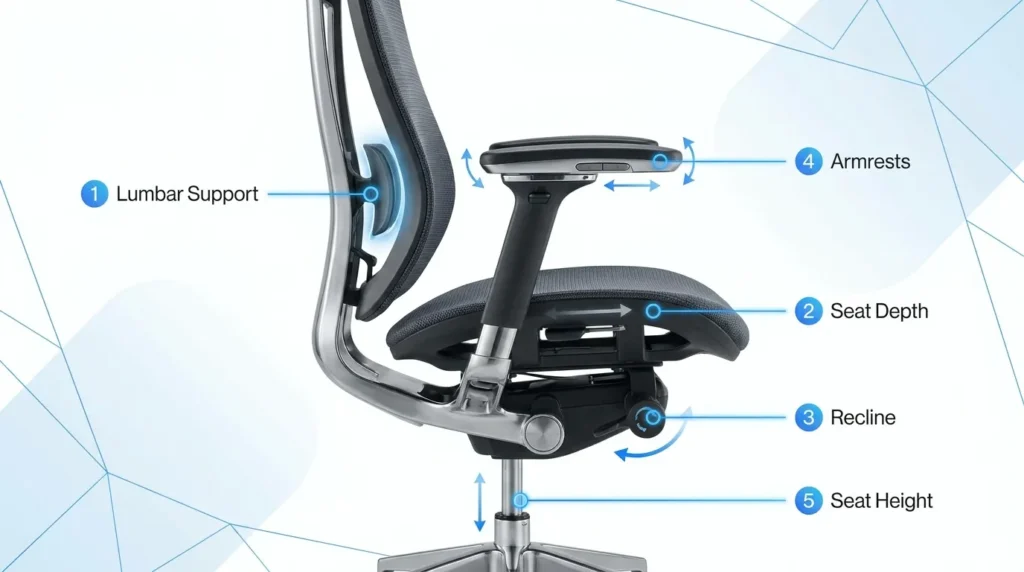
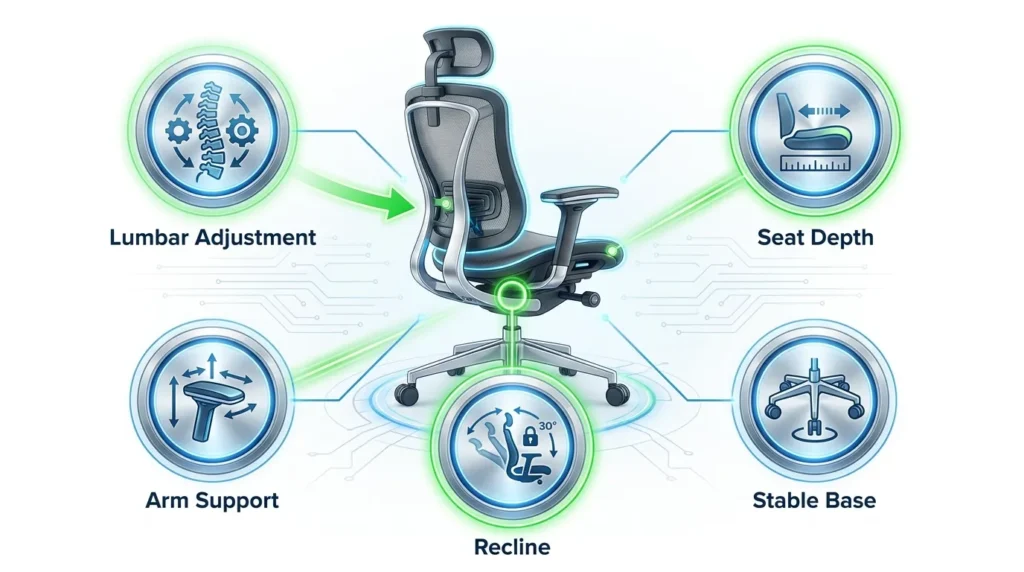
The best ergonomic chairs for lower back pain should have adjustable lumbar support, adjustable seat depth, a synchro-tilt recline mechanism, and adjustable armrests. These features help maintain the natural curve of the spine, reduce pressure on the lower back, and improve comfort during prolonged sitting.
Why Your Chair Matters More Than You Think
When you sit, lumbar disc pressure increases compared to standing. That load increases even more when the spine loses its natural curve.
Spinal load research archived through the National Institutes of Health shows seated posture significantly affects lumbar disc pressure.
OSHA also emphasizes that improper chair height, seat depth, and backrest support contribute to musculoskeletal strain in desk workers.
In simple terms:
Unsupported sitting = muscle fatigue
Muscle fatigue = compensation
Compensation = pain
The right chair reduces that cycle.
What Makes a Chair Good for Lower Back Pain?
Before jumping into models, here’s what actually matters.
1️⃣ Adjustable Lumbar Support (Height + Depth)
Fixed lumbar bumps don’t work for everyone.
A proper ergonomic chair should allow:
- Lumbar height adjustment
- Lumbar depth (forward/back) adjustment
Everyone’s spine curvature is different.
Without adjustability, it’s guesswork.
2️⃣ Adjustable Seat Depth
Seat depth is wildly underrated.
When seated fully back, you should have 2–3 finger widths between the seat edge and the back of your knees.
Too deep → You slide forward.
Too shallow → You lose thigh support.
Both increase lumbar strain.
3️⃣ Recline Tension + Lock Control
Research frequently cited in spinal biomechanics shows slight recline reduces lumbar disc pressure compared to rigid upright sitting.
Look for:
- Synchro-tilt mechanism
- Adjustable tension
- Multiple lock positions
Rigid posture all day is exhausting.
Supported recline is sustainable.
4️⃣ Stable Base + Arm Adjustability
Armrests that are too high or too low force shoulder compensation.
Look for:
- Height adjustable arms
- Width adjustment
- Pivot (optional but helpful)
Proper forearm support reduces upper back tension, which indirectly reduces lower back compensation.
NIOSH workplace ergonomics guidance reinforces neutral upper limb positioning during computer tasks.
Chair Categories Compared
Instead of pushing brand hype, let’s compare the major chair types.
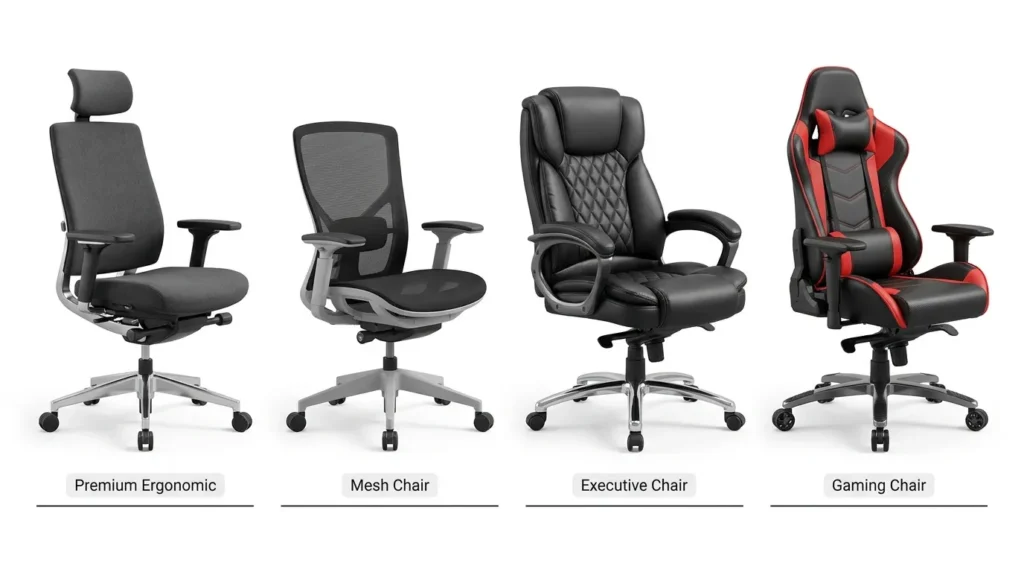
1️⃣ High-End Fully Adjustable Ergonomic Chairs
Best for: Chronic lower back pain, long 8+ hour days
Features:
- Fully adjustable lumbar height and depth
- Adjustable seat depth
- Advanced tilt mechanisms
- Multi-directional armrests
Pros:
- Excellent spinal support
- Highly customizable
- Long lifespan
Cons:
- Higher upfront cost
- Adjustment learning curve
These chairs are ideal if:
- You sit 6–10 hours daily
- You’ve tried cheaper options without relief
- You want maximum adjustability
2️⃣ Mid-Range Ergonomic Mesh Chairs
Best for: Mild to moderate discomfort
Features:
- Basic lumbar support (sometimes adjustable)
- Height adjustment
- Limited seat depth options
Pros:
- More affordable
- Breathable
- Good general support
Cons:
- Limited lumbar depth control
- Often fixed seat pan
These can work well if:
- Your pain is posture-related but not severe
- You move frequently during the day
3️⃣ Executive Padded Chairs (Use Caution)
These look comfortable.
They’re often not supportive long-term.
Common issues:
- Overly soft cushioning
- Fixed lumbar area
- Poor recline mechanics
Soft cushioning may feel good initially but can reduce spinal stability over time.
For lower back pain, adjustability matters more than padding.
4️⃣ Gaming Chairs (Mixed Results)
Some gaming chairs advertise “lumbar support.”
In reality:
- Many use removable pillows
- Seat depth is rarely adjustable
- Lumbar positioning is fixed
For some users, they work fine.
But for true ergonomic support, office chairs designed around workplace ergonomics standards generally perform better.
Tested Feature Comparison (What Actually Helps Most)
Based on ergonomic principles and long-term comfort factors:
| Feature | Impact on Lower Back Pain |
| Adjustable lumbar height | High |
| Adjustable lumbar depth | Very High |
| Seat depth adjustment | High |
| Synchro-tilt recline | Moderate to High |
| Fixed lumbar support | Low to Moderate |
| Thick padding only | Low |
If budget forces trade-offs:
Prioritize lumbar adjustability first.
Then seat depth.
How to Choose the Right Chair for You
Ask yourself:
- Do I sit more than 6 hours daily?
- Does my lower back lose contact with the chair?
- Do I slide forward during the day?
- Does reclining reduce my discomfort?
If yes to multiple adjustability should be your top priority.
When a Chair Alone Isn’t Enough
Even the best ergonomic chair won’t fix:
- Completely inactive glutes
- No movement breaks
- Poor monitor height
- Incorrect desk height
The CDC emphasizes regular movement during prolonged sitting to reduce musculoskeletal strain.(Source)
The chair is one piece of the system.
Movement is the other.
Final Thoughts
The best ergonomic chair for lower back pain isn’t the most expensive one.
It’s the one that:
- Supports your lumbar curve
- Fits your body proportions
- Allows you to adjust frequently
- Encourages slight recline
- Keeps your hips properly positioned
Adjustability beats aesthetics.
Support beats softness.
Movement beats perfection.
If you’re currently dealing with lower back pain from sitting all day, start by adjusting what you already have.
If that doesn’t help, upgrade based on lumbar and seat depth control first.
Most people feel a difference within weeks once proper support is in place.
FAQ
What is the best ergonomic chair feature for lower back pain?
Adjustable lumbar support is the most important feature because it helps maintain the natural curve of the lower spine.
Is a mesh chair good for lower back pain?
Yes. A high-quality mesh chair with adjustable lumbar support and seat depth can provide excellent comfort and airflow for extended sitting.
Can an ergonomic chair eliminate lower back pain?
An ergonomic chair can reduce strain and improve posture, but regular movement, proper desk setup, and healthy work habits are also essential.
Is seat depth adjustment important?
Yes. Proper seat depth supports the thighs while allowing 2–3 finger widths between the seat edge and the back of the knees.
Are gaming chairs good for lower back pain?
Some gaming chairs provide decent support, but many lack adjustable lumbar support and seat depth compared to ergonomic office chairs.
How long does it take to get used to an ergonomic chair?
Most people adapt within one to three weeks after correctly adjusting the chair to fit their body.