


Most ergonomic advice sounds simple.
“Sit up straight.”
“Take breaks.”
“Adjust your chair.”
But that advice falls apart around 2:47 PM when you’ve been in meetings all day and your lower back starts whispering complaints.
A real ergonomic setup isn’t about one adjustment.
It’s about how your body moves (or doesn’t move) across an entire 8-hour workday.
Let’s walk through it chronologically from morning login to late afternoon fatigue.
Phase 1: The First 30 Minutes (Setup Matters More Than You Think)
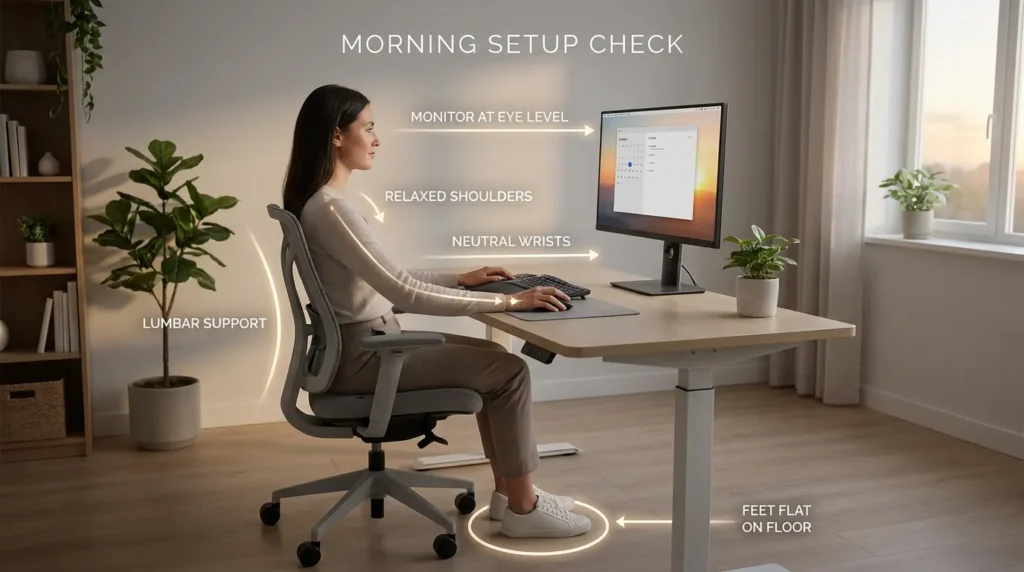
When you first sit down, your body is neutral.
This is the best time to set your posture correctly.
Quick Morning Alignment Check
Before answering email:
☐ Feet flat on floor
☐ Knees roughly 90–100 degrees
☐ Lower back supported
☐ Monitor at eye level
☐ Shoulders relaxed
☐ Wrists neutral
OSHA outlines that neutral posture reduces musculoskeletal stress during workstation use.
If you start misaligned, fatigue compounds all day.
Most people adjust posture reactively.
It’s better to start proactively.
Phase 2: Hours 1–3 (Sustained Focus Block)
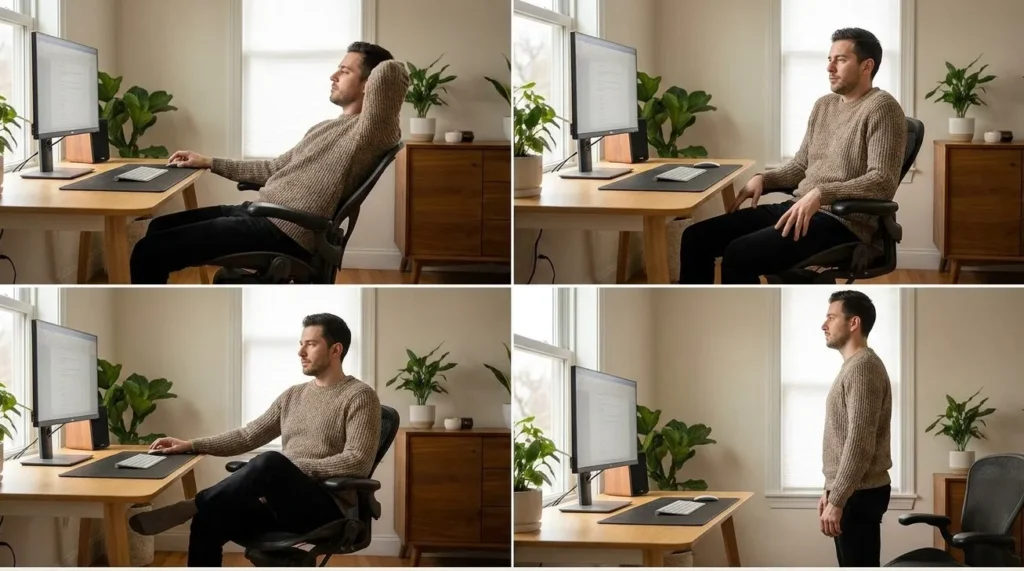
This is typically your highest productivity window.
The danger here?
You don’t move.
The CDC notes that prolonged static posture contributes to discomfort and fatigue.
Even in a premium ergonomic chair, staying frozen increases strain.
What To Do
Every 45–60 minutes:
- Slightly recline for 2–3 minutes
- Roll shoulders gently
- Shift seated position
- Stand briefly if possible
Small movement prevents stiffness from building unnoticed.
You don’t need a full break.
Just interrupt static posture.
Phase 3: Midday Slump (Hours 3–5)
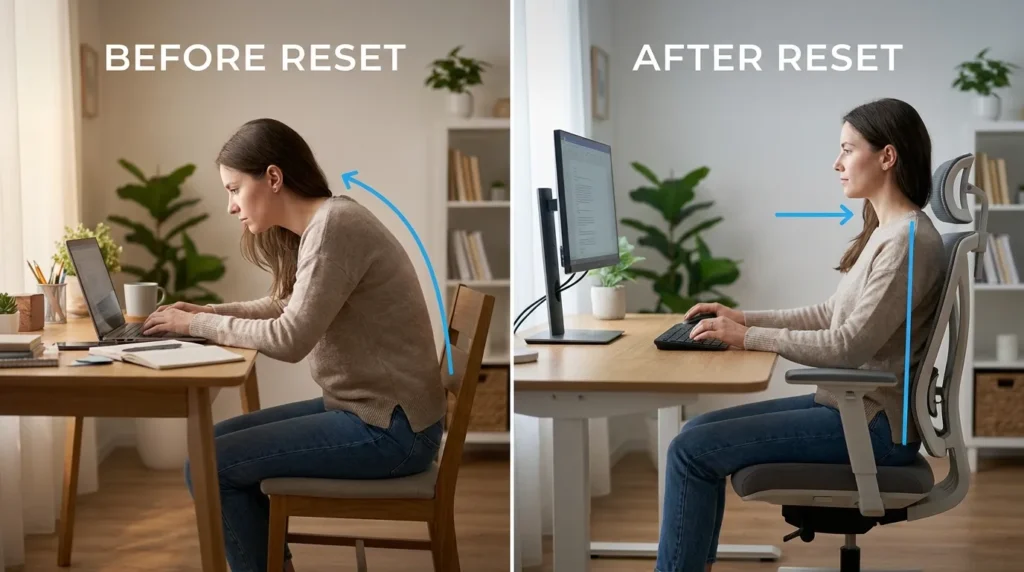
This is where posture collapses quietly.
You lean forward.
Lumbar contact weakens.
Neck creeps toward the monitor.
NIOSH highlights that poorly fitted seating contributes to musculoskeletal strain over time.
Now is the moment to reset.
Midday Reset Checklist
☐ Re-engage lumbar support
☐ Sit fully back in the chair
☐ Bring monitor closer if leaning forward
☐ Relax jaw and shoulders
☐ Take a 5-minute walk
The walk matters more than you think.
Phase 4: The Afternoon (Hours 5–7)
This is when chair quality becomes obvious.
Cheap chairs compress.
Lumbar support fades.
Pressure points appear.
Research indexed in PubMed consistently links sustained poor posture and pressure distribution with musculoskeletal discomfort.
Even in a high-end chair, fatigue sets in.
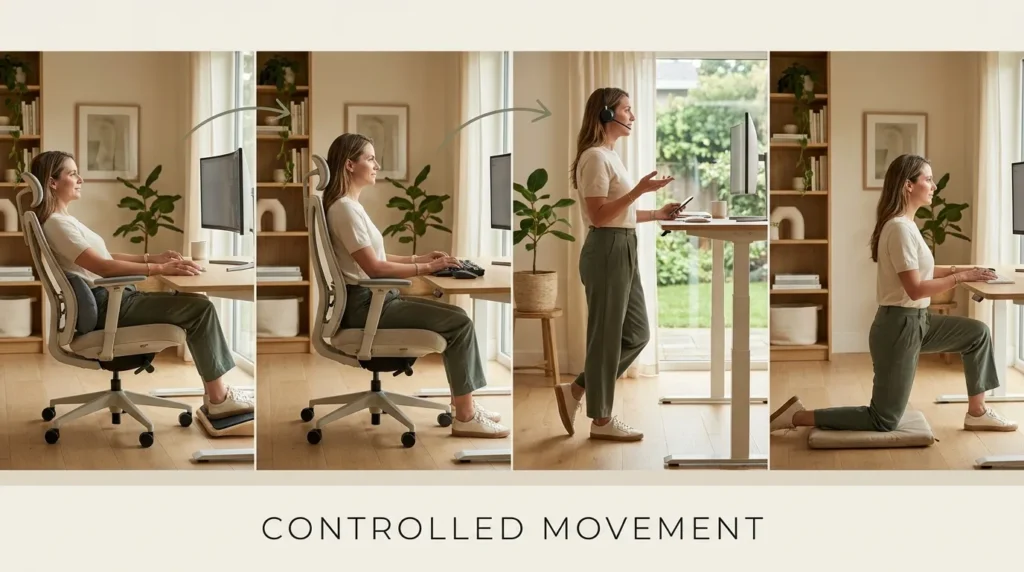
Strategy: Controlled Movement
Instead of sitting rigidly:
- Use recline tension adjustments
- Alternate upright and slight recline
- Stand during phone calls
- Stretch hip flexors briefly
Static sitting is more problematic than sitting itself.
Movement is your ally.
Phase 5: Final Hour (Hours 7–8)
Energy is lower.
Focus is thinner.
Posture is vulnerable.
This is when many people cross their legs, slump, or lean sideways.
Instead of fighting fatigue, adjust around it.
End-of-Day Blueprint
- Slightly recline for low-focus tasks
- Lower screen brightness to reduce forward lean
- Keep lumbar engaged
- Stand for last 10 minutes if possible
Think sustainability — not perfection.
The Ergonomic Triangle: Chair, Desk, Monitor
An ergonomic blueprint fails if one component is wrong.
1️⃣ Chair
- Adjustable lumbar
- Seat depth control
- Proper height
- Recline tension
2️⃣ Desk
- Elbows at 90 degrees
- Surface not too high
- No shoulder elevation
3️⃣ Monitor
- Top of screen at eye level
- 20–30 inches from face
- No neck craning
OSHA emphasizes workstation alignment across all components — not just seating.
You can’t fix a poor desk setup with a premium chair alone.
Micro-Break Blueprint (Simple But Effective)
Every 60–90 minutes:
- Stand
- Walk for 2–5 minutes
- Stretch hip flexors
- Roll shoulders
- Reset posture
It doesn’t need to be dramatic.
Consistency beats intensity.
Common 8-Hour Workday Mistakes
❌ Waiting until discomfort appears
❌ Ignoring seat depth adjustment
❌ Locking recline permanently
❌ Using armrests too high
❌ Not adjusting monitor distance
Small misalignments multiply across eight hours.
Climate & Material Considerations
Mesh chairs perform better in warmer climates due to airflow.
Upholstered chairs feel warmer in cooler environments.
By mid-afternoon, temperature comfort influences fatigue.
This isn’t marketing — it’s experience.
The Real Blueprint (Summarized)
Morning → Align correctly
Mid-Morning → Micro-adjust
Midday → Walk and reset
Afternoon → Recline and shift
Final Hour → Reduce strain
It’s not about perfect posture.
It’s about avoiding prolonged poor posture.
Reflective Question
By 4 PM, what do you feel first:
Heat?
Lower back fatigue?
Neck tension?
Wrist stiffness?
Your answer reveals which part of your setup needs refinement.
FAQ
How often should you take breaks from sitting?
Brief movement every 45–60 minutes helps reduce static posture strain.
What is the ideal ergonomic posture for 8 hours?
Neutral spine alignment with lumbar support, relaxed shoulders, feet flat, and monitor at eye level.
Is a standing desk necessary for ergonomics?
Not required, but alternating between sitting and standing can reduce prolonged static posture.
Can a chair alone fix poor posture?
No. Chair, desk, monitor height, and movement patterns all contribute.