


If you’ve already decided on Steelcase, you’re not shopping entry-level.
You’re choosing between two of the most engineered ergonomic chairs on the market:
- Steelcase Leap
- Steelcase Gesture
Both carry 12-year warranties.
Both are enterprise-grade.
Both are built for long workdays.
But they feel very different once you’ve spent six hours in them.
This breakdown goes beyond specs; we’ll compare real-world comfort, lumbar systems, arm support, and long-session performance.
1️⃣ Design Philosophy: Adaptive Lumbar vs Upper-Body Freedom
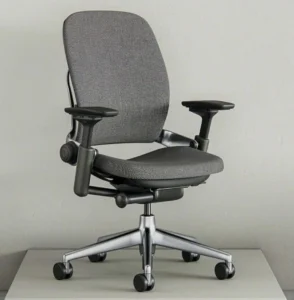
Steelcase Leap
The Leap is built around lumbar customization.
It emphasizes:
- Adjustable lumbar depth
- Adjustable lumbar height
- Seat depth control
- Flexible “LiveBack” spine system
It’s engineered around lower back mechanics.
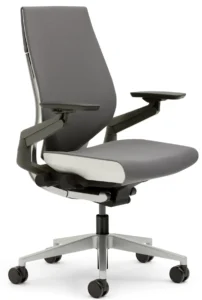
Steelcase Gesture
Gesture was designed around how people actually move today typing, tablet use, leaning back, holding phones.
It emphasizes:
- Highly articulated armrests
- Upper body positioning
- Dynamic posture shifts
The Leap focuses on lumbar precision.
The Gesture focuses on whole upper-body movement.
2️⃣ Lumbar Support Comparison
| Feature | Leap | Gesture |
| Lumbar Height Adjustment | ✔ | ✖ |
| Lumbar Depth Adjustment | ✔ | ✖ (fixed support) |
| Lower Back Customization | High | Moderate |
Leap
You can increase or reduce lumbar pressure.
If you’ve ever felt lumbar support was “too aggressive,” Leap allows you to dial it in.
Gesture
Lumbar support is built-in and less customizable.
It feels supportive but not deeply adjustable.
If you prefer controlling lumbar intensity → Leap usually wins.
3️⃣ Armrest Engineering (Gesture’s Strength)
This is where Gesture stands out.
Mayo Clinic notes that arm positioning plays a major role in preventing shoulder and wrist strain.
| Armrest Feature | Leap | Gesture |
| Height | ✔ | ✔ |
| Width | ✔ | ✔ |
| Pivot | ✔ | ✔ |
| 360° Articulation | ✖ | ✔ |
Gesture’s armrests move in nearly every direction.
If you:
- Use multiple monitors
- Shift typing angles
- Use a tablet frequently
- Lean back while typing
Gesture’s arm design often feels superior.
If you work mostly straight-on at a keyboard → Leap’s arms are more than sufficient.
4️⃣ Seat & Cushion Feel
Both use high-density foam — not mesh.
But they feel slightly different.
Leap
- Slightly softer seat
- More traditional cushioning
- Feels familiar
Gesture
- Slightly firmer seat
- More structured support
- Feels upright and stable
Gesture’s firmer structure encourages upright posture slightly more than Leap.
5️⃣ Hour 1 vs Hour 8 Performance
This matters more than showroom impressions.
Hour 1
Both feel premium.
No major separation.
Hour 4
Leap:
- Lumbar customization becomes valuable.
- Feels forgiving.
Gesture:
- Arm articulation becomes noticeable.
- Encourages upright positioning.
Hour 8
Leap:
- Softer cushioning feels comfortable.
- Lumbar support still customizable.
Gesture:
- Upper body feels more supported.
- Arms reduce shoulder fatigue noticeably.
The Canadian Centre for Occupational Health and Safety (CCOHS) emphasizes that reducing static posture and supporting natural movement reduces musculoskeletal strain.
Gesture tends to shine for upper-body movement.
Leap shines for lower-back fine-tuning.
6️⃣ Movement & Recline
Both chairs include:
- Smooth recline
- Tension control
- Multiple tilt settings
Leap feels slightly more relaxed when reclining.
Gesture feels more controlled and upright.
If you frequently lean back to think or read → Gesture may feel more balanced.
If you alternate between upright typing and moderate recline → Leap feels versatile.
7️⃣ Climate & Heat Retention
Both are upholstered chairs.
Neither offers full mesh airflow like Aeron.
In warmer climates, both may feel warmer than mesh alternatives.
In cooler offices, cushioning feels comfortable.
8️⃣ Body Type Considerations
| Body Type | Better Fit |
| Needs lumbar customization | Leap |
| Needs arm flexibility | Gesture |
| Sits upright most of day | Gesture |
| Frequently shifts posture | Leap |
| Lower back sensitivity | Leap |
Neither offers multiple size frames like Aeron (A/B/C), but both fit a broad range of users.
9️⃣ Durability & Warranty
Both:
- 12-year warranty
- Enterprise-grade construction
- Strong long-term durability
Foam may soften slightly over many years.
Frame integrity remains strong in both models.
Deep Comparison Matrix Summary
| Preference | Leap | Gesture |
| Adjustable lumbar depth | ✔ | |
| Highly articulated armrests | ✔ | |
| Softer seat feel | ✔ | |
| Firmer structured support | ✔ | |
| Upper-body flexibility | ✔ | |
| Lower-back customization | ✔ |
Neither chair is objectively better.
They prioritize different body mechanics.
Final Decision Framework
Choose Steelcase Leap if:
- Lumbar depth control matters most
- You want seat depth adjustment
- You prefer slightly softer cushioning
- Lower back sensitivity is a concern
Choose Steelcase Gesture if:
- Arm positioning flexibility matters
- You use multiple devices frequently
- You lean back while typing
- Shoulder comfort is a priority
The real difference:
Leap focuses on the lower spine.
Gesture focuses on the upper body.
FAQ
Is Leap more comfortable than Gesture?
Leap offers more lumbar customization and a slightly softer seat, while Gesture offers superior arm articulation.
Is Gesture better for shoulder pain?
Gesture’s highly adjustable armrests may reduce shoulder strain during varied device use.
Which is better for long hours?
Both perform well for extended sitting. Preference depends on whether lumbar customization or arm flexibility matters more.Do both have the same warranty?
Yes, both include Steelcase’s 12-year warranty.